
I would like to pay someone to make custom versions of Alchemist and Wizard firmware where the audio output volume is maxed out

Hi, I still use these little boxes quite regularly, and part of the ritual I must go through whenever I turn them on is to hold one of the buttons and turn one of the knobs all the way up, then un-turn the knob I turned to the setting I wanted it to be on previously :laughing:

I see in the firmware that there is a AUDIO_OUTPUT_GAIN constant that if raised to 127 (I think, or whatever the maximum is), then that would solve my problems and I’d never need to set the output volume manually again. But I am out of my depth compiling and rolling my own firmware, don’t have an ST Link and don’t have a machine set up for compiling firmware. I would rather send someone some cash to someone who knows what they are doing to do it for me.

Please let me know if you are interested! Happy to work out a price etc if I see anyone might be keen
don’t have an ST Link
It’s not required unless you try to debug something, the firmware builds are converted to MIDI Sysex

don’t have a machine set up for compiling firmware

You don’t have any PC at all?

Anyway, compiling anything is not required here, there’s an easier way to do it. I’m not sure why Martin didn’t save settings after changing them the way you describe, maybe he would consider that a mistake now. But you can still set it permanently by MIDI. Try this:

  1. Go to OpenWareLaboratory
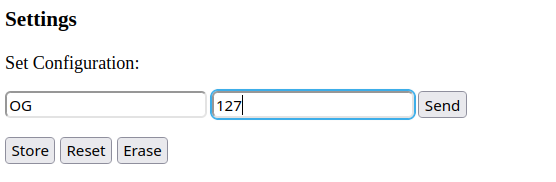
  2. Enter this:
    image
  3. Click Send, then Store

This should set your output Gain to max, you can also use IG configuration for input gain if necessary. I’m not sure why it’s using only 112 by default, I assume that there could be some reason (signal clipping or whatever) which is not necessary valid for all devices.

Thanks antisvin that worked! I had tried something similar in the past as you once replied to a similar ask of mine about the Witch - I’ve come to realise that OpenWareLaboratory page fails silently on Firefox, but trying Chrome today works :slight_smile:

You don’t have any PC at all?

Well I have a macbook. It was more that I’d not used this machine to compile C++ before (and I’m not experienced in doing that), and when I explored building the firmware locally I saw it relied on a couple of external dependencies, which appeared to have version changes over time so I assumed I’d need to grab the right ones to match the version of the owl firmware, which then brings in the hypothetical possibility of integrating wrong or maybe producing firmware that didn’t work. And without a verification workflow or know of a way to debug it was all a bit too hard :stuck_out_tongue:

I’m glad that a single MIDI event could solve my problem. Thanks again